My Account
In My account, you can manage your user account. You can change your email address or password, or set up two-factor or multi-factor authentication (2FA / MFA). You can also see where you are logged in and which organizations you are a member of.
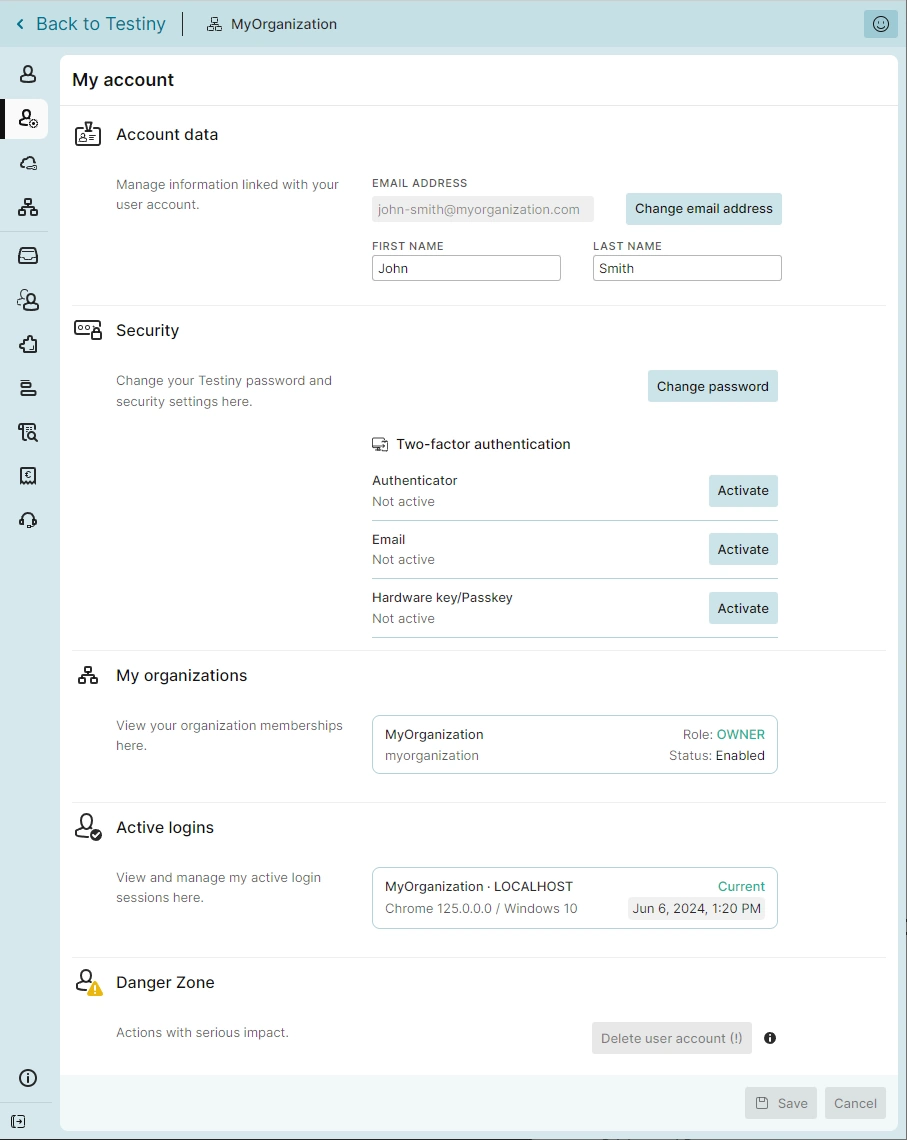
Changing your credentials
- Account data — Here you can change your email address, first name, and last name.
When changing your email, a confirmation email will be sent to the new address with a "Confirm email change" button. To finalize the change, please click this button in the email.
For single sign-on users, please ensure that your new email address is also configured in the single sign-on provider.
-
Password — In the security section, you can change your password. Testiny automatically evaluates your password strength and blocks weak or vulnerable passwords.
A good password consists of more than 10 characters, uses upper/lower case, numbers, and special characters. -
Two-factor authentication (2FA / MFA) - For additional security, you can configure optional two-factor authentication. Besides the login, the second factor is required for critical changes such as changing your email or deleting your account.
Choose one or more of our two-factor authentication methods:- Authenticator
Any Authenticator that supports one time passwords will work. For example: - Email
Receive a one-time password as email to confirm your actions. - Hardware key/Passkey
Set up any hardware security key (FIDO2) or device as a second factor.
infoAs an administrator, configure password requirements or require 2FA / MFA for all users in the organization settings.
- Authenticator
Account information
-
My organizations — See all the organizations you're a member of, as well as your role and status.
-
Active logins — See a list of active logins. You can logout from any session, that is not your current one.
Delete user account
You can delete your user account here.
To do so, complete all the fields in the dialog that appears and click "Confirm".
Please note: This deletes your account, but not the organizations you are member of. In case you are owner of an organization, you can't delete your user account - please transfer your ownership before deleting your account.
This action is irreversible, so be really sure you want to proceed!