We setup redmine in AWS cloud and use white list for client IP to protect security access. we got testiny server’s ip by “ping testiny.org” command and get the ip in response. then added this ip to white list of AWS cloud. but add integration still failed like attached image. Is the testiny server ip not correct or testiny not support such url like http://192.168.0.1:30070/ ?
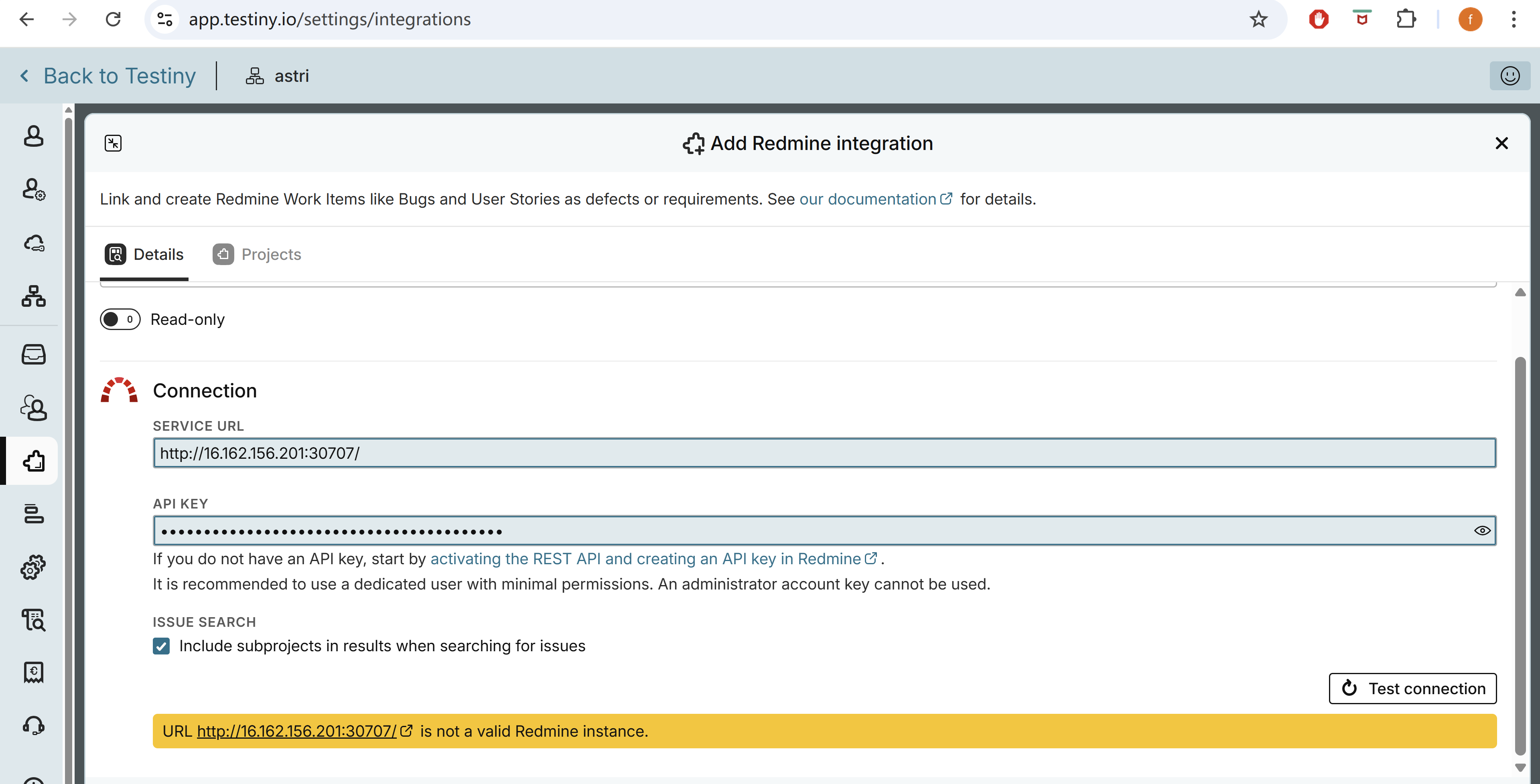
First, you need to get the IP from app.testiny.io which is the correct URL to Testiny 
However, this might still not work because the Testiny Redmine integration has the following requirements for the Service URL (for security measures):
- a valid DNS resolvable host name or IP address
- HTTPS transport protocol
- port must be 443 (default HTTPS port)
Best regards,
Alex
We have met the above conditions:
1.a valid DNS resolvable host
2.HTTPS transport protocol
3.port must be 443 (default HTTPS port)
We can access URL in the browser,but testniy still cannot connect to Redmine.
Could you please take another look at the error in the screenshot? Thanks very much.
And the API Key is valid.
The error means that either your API key is invalid or the API key is not authorized to access the project.
Please, be aware that even if the API key is invalid, the Redmine API will always return the response you posted.
Also make sure that the REST-API is enabled in the Redmine configuration (API tab).
Best regards,
Alex
@Alex_Hoisl Thanks for your reply. I think we have met all the requirements you mentioned above. Please check the screenshot above. Thanks.
And I can access it on my phone using mobile data and log in with the username.
Thanks for the details, I was able to replicate the problem, but I’m not sure this is a problem with Testiny.
The issues.json URL seems to be accessible with and without an API key - just remove the API key and you will still get all issues. I have no idea how this is possible with Redmine, but it seems this is a sever security issue if your issues are not intended for the public.
What Testiny does to verify the Redmine connection is trying to access the my/account.json URL, i.e. for you: https://orch.redmine.com.chickenkiller.com/my/account.json
This page requires a valid authentication, so can you check this page with your API key please?
I have tried and it did not work, but you surely already reset your API key after posting it publicly in this forum, right?
Best regards,
Alex
Thank you for your reply. My API key has been reset.
Standard Redmine API endpoints work correctly. For example:
curl “https://orch.redmine.com.chickenkiller.com/users/current.json?key=MY_API_KEY”
Returns valid user JSON as expected.
However, Testiny appears to be requesting:
GET /my/account.json?key=…
The request to /my/account.json either returns a login page or hangs, which causes Testiny to interpret it as an authentication failure.
Could you please update your Redmine integration to use the correct, standard Redmine API endpoint (/users/current.json) for user validation?
Thank you for your help!
Best regards,
fen
What version is your Redmine server? It could just be that the server version is too old.
Testiny currently supports Redmine 4.1 and higher.
Best regards,
Alex
The version is 3.4.6. Thanks.
Best regards,
Fen
Sorry, this version is too old and lacks API routes Testiny needs.
I would highly recommend updating, the version you’re using is from 2018(!) and will most likely be a sever security problem if accessible publicly.
Best regards,
Alex
Thanks very much. It is ok now after upgrading Redmine version.
Best regards,
Fen