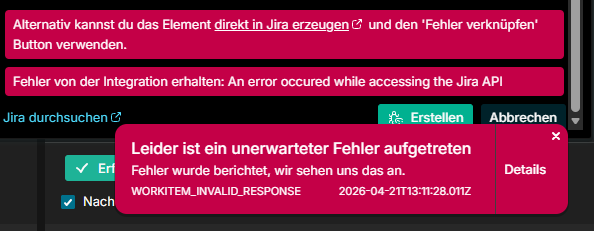
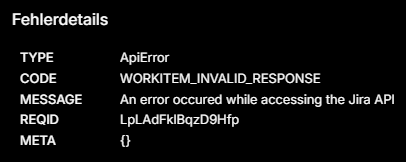
As you can see in the image below, when creating a jira item out of testiny, this occurs. It is also not possible to find jira-items in testiny to link them back! The Projects are read back correctly, but items cannot be found. Please help and/or fix!
Hi and welcome to the Testiny forum!
Can you please check that you have access to create & read issues in this project?
From our server logs I can see that Jira responded with error “You cannot create issues in this project.”.
See here for a list of required Jira permissions:
We will try to improve the error messages for the dialog, so the reason for the error is more understandable.
Best regards,
Alex
We replaced our Token and give it all permissions - still same behaviour.
Is the Testiny Jira-Addon required? We want to be able to link (and create) bug tickets from jira to testcases and want to see the status in testiny. We dont want to see Testiny Details rendered in Jira.
No, the Testiny Jira-Addon is not required at all, just a working token with permissions to create issues in Jira is required.
We do not see any other connection issues with Jira and I also tried with multiple Jira test accounts, but with no problems.
The error message for your requests is still the same: “You cannot create issues in this project.”
So it still seems to be some permission problem with the token, but it’s hard for us to guess what the problem might be - Testiny only sees the answer from the Jira server.
There are a few things you can try:
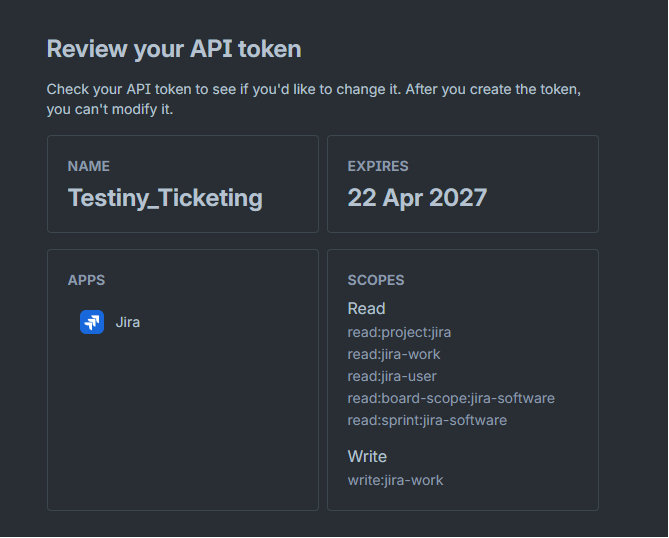
- recheck that your granular token has the following permissions:
read:project:jira, read:jira-work, read:jira-user, read:board-scope:jira-software, read:sprint:jira-software, write:jira-work - create a classic (non-granular) token and try that one
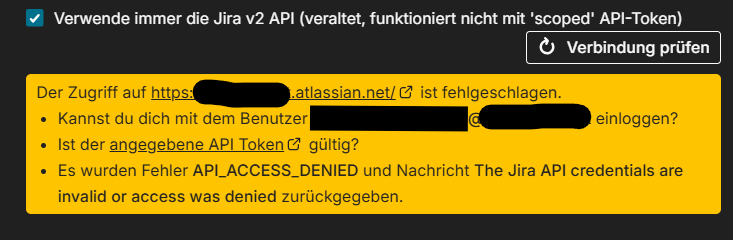
- in Testiny, also try to switch the setting for the Jira integration “Always use Jira v2 API (legacy, does not work with ‘scoped’ API tokens)” on and off
Thanks!
Best regards,
Alex

Thanks for the support! The IT colleague had no permissions on our projects in jira. I was not aware that I (as a normal user) can also create API tokens. This fixed the issue. Keep up your good work!