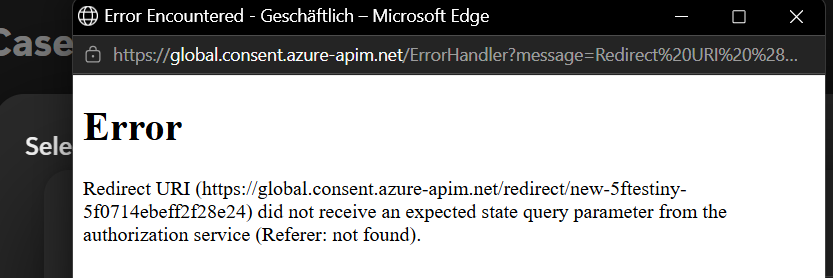
I’m trying to setup an agent in my copilot Studio and I get this error
can you help me pls? thanks
9 Answers
9Hi Luca,
I assume you’re trying to set up a connector to the Testiny MCP Server with OAuth Authorization. Did it work previously, or are you trying to set it up for the first time?
Did you to enable OAuth connections in your Testiny organization settings or do you restrict any redirect URls there?
If that’s not the issue, we might have already fixed the missing state query parameter issue with the upcoming Testiny version v1.41.0 (will be released in the next few days).
If that does not fix your issue, it would be a great help if you could share more details (how did you set it up; error/network logs from the requests,…) to further investigate the issue.
Best regards,
Hanna
Hi Hanna
thanks for answering. Yes it’s the first time I try to setup this connection and it’s never worked.
OAuth connections are allowed in my Company Settings
I will try with v1.41.0 and then I hope it will work
bests, Luca
Hi Hanna,
I am currently experiencing a very similar issue while trying to connect the Testiny MCP Server to Microsoft Copilot Studio.
I configured the MCP server with:
-
Server URL:
https://app.testiny.io/api/v1/mcp-server -
Authentication: OAuth 2.0
-
Configuration type: Dynamic (with discovery)
In our Testiny organization settings, I have also enabled OAuth2 under External App Access, and Restrict allowed redirect URLs for OAuth2 apps is disabled.
However, Copilot Studio still fails to create the MCP server connection.
I also tried using a Testiny API key instead of OAuth, but the MCP server could not be created that way either.
Could you please confirm whether the issue mentioned above regarding the missing state query parameter has already been fixed in the current Testiny version?
Also, is https://app.testiny.io/api/v1/mcp-server the correct MCP endpoint for Microsoft Copilot Studio, and is OAuth 2.0 with dynamic discovery the recommended configuration?
Thanks a lot for your help!
Best regards,
Mehmet
Hi Mehmet,
The issue has unfortunately not been fully fixed with the latest release (v1.41.0); but we’ve been able to reproduce the issue and a fix will be included in the next version 
Best regards,
Hanna
Thanks for the update, Hanna.
Hi Hanna,
thanks for the update! Do you already have an approximate date for when the next version will be released?
I’m currently setting up a new project in Testiny and would really like to integrate Copilot via MCP from the beginning, as this could save us a lot of time when creating and managing our test cases.
So I would be very happy if the fix becomes available soon. 
Thanks again for your support!
Best regards,
Mehmet
Hi all,
The next release will be out in the next 1-2 weeks, but we recommend authenticating with an API key for now.
@Mehmet_Ozfidan Ad “I also tried using a Testiny API key instead of OAuth, but the MCP server could not be created that way either.” => This should already work, could you please share error details?
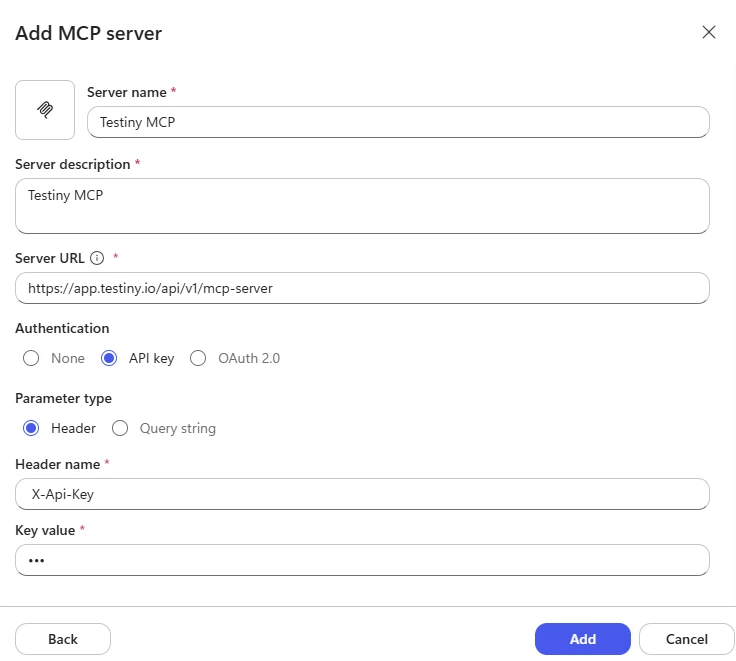
And for anyone who comes across the topic; the MCP Server for Copilot Studio with API keys can be set up this way:
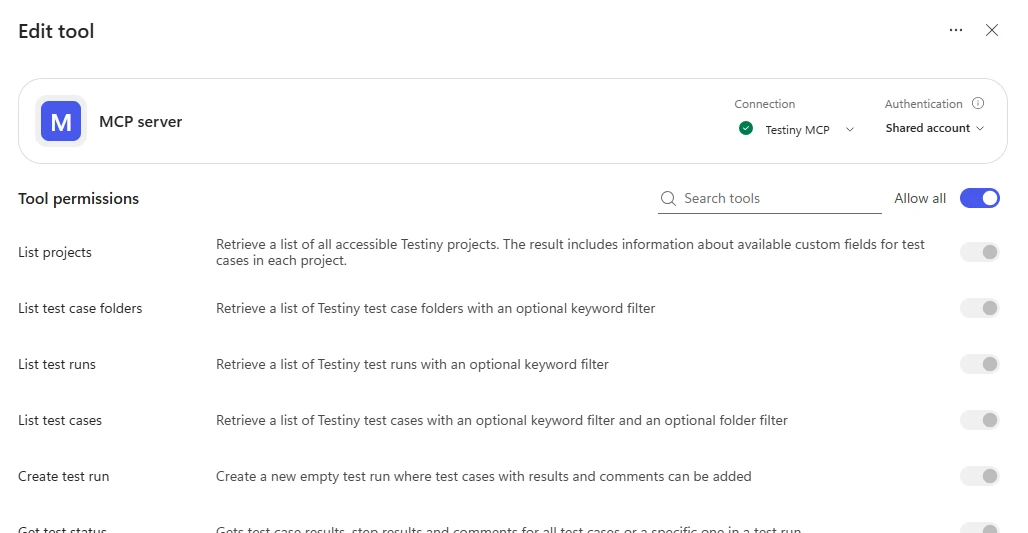
And you should then be able to see all available tools when editing it:
Best regards,
Hanna
Thanks for the detailed update.
We shipped another update with the latest release Testiny v1.42.0. Please give it a try, thank you!
Best regards,
Alex
Hi Hanna, thanks for your help! I found the issue. I had entered the header incorrectly, which is why the connection did not work. After correcting it, the connection via API key works successfully now. Best regards, Mehmet
– Mehmet_Ozfidan