Hi David and thank you for your feedback!
The approach to show the cumulative count of test cases from the current + all sub folders is indeed on purpose. It shows how many TCs really are in these folders, i.e. how many TCs would be impacted when moving or deleting the folder (which would also move/delete all sub folders including the TCs in them).
You can see the number of TCs directly in this folder in the status line of the table, e.g. “7 results” vs the total number of summed up “62” TCs in this demo project:
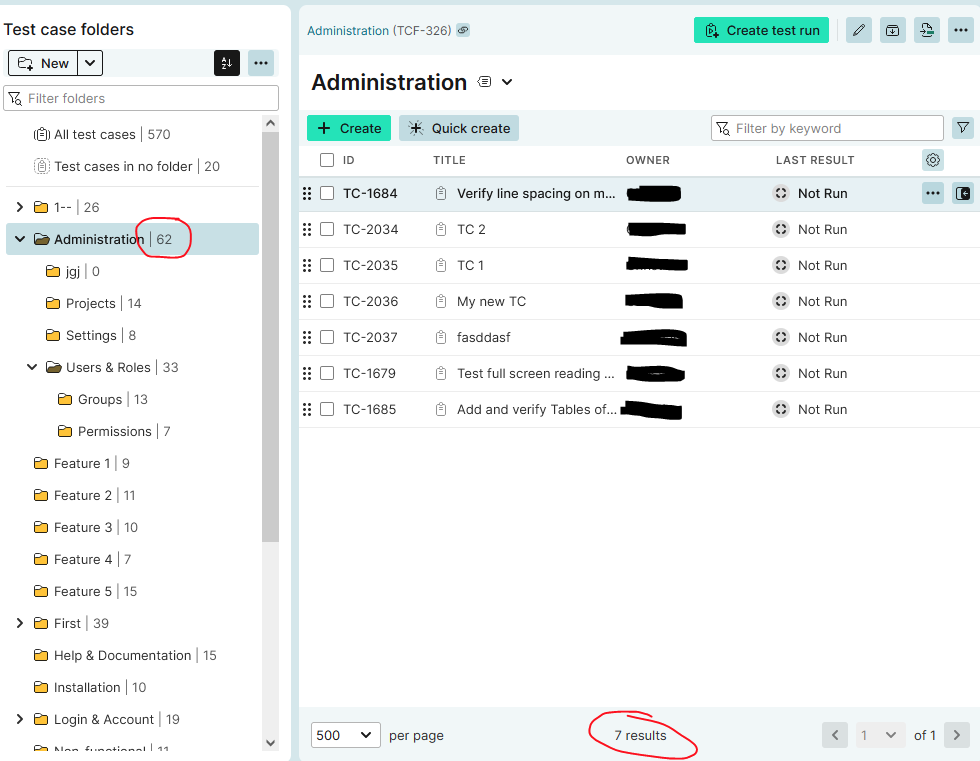
What we want to do in the future to make it less confusing is to also show TCs from sub folders when viewing a folder, just like when you are in the “All test cases” folder - and allow to switch between this “show TCs from subfolders” or “shows TCs only from current folder” modes.
Best Regards,
Alex
Hi! Would it be possible to implement the same view that is available under "All test cases" so that i could see all folders and test cases nested under a folder?
– Bird_bee_bushYes, this is also on our feature roadmap, so to always have the hierarchical view, even when being in a folder
– Alex_Hoisl