Manual and automated testing, side by side.
Fast, AI-ready test management tool for teams that want one system for manual testing and automation results, their preferred AI assistant, and a choice between EU cloud and self-hosting.
Works with your stack
Jira, GitHub, GitLab & more
Migrated in a day
Cases & results
21-day free trial · No credit card required
Integrates seamlessly with


Why teams choose Testiny
No AI lock-in. No framework lock-in. No infrastructure lock-in.
Modern and AI-ready, but still framework-neutral, deployment-flexible, and built to fit how your team already works.
Your AI, your choice
Connect Claude Desktop, VS Code Copilot, or whatever your team already uses via the MCP Server, to create test cases, run tests, and update results with natural-language commands. No closed AI silo.
AI Support (MCP Server)Framework-neutral automation
Import results from Playwright, Cypress, Selenium, or JUnit, and consolidate every outcome into one unified report. Keep your CI/CD pipeline exactly as it is.
Test automationJira, not Jira lock-in
Create, link, and update issues in Jira, Linear, GitHub, GitLab, or Azure DevOps, plus SSO with any OIDC provider. Test cases, results, and history stay in Testiny.
Jira integrationMigrate without the risk
Import directly from TestRail, Zephyr, or Xray via API — with images and attachments included — or from Qase, TestLink, and CSV/Excel with text formatting, requirements, and custom fields.
Migrate to TestinyFast, real-time UX
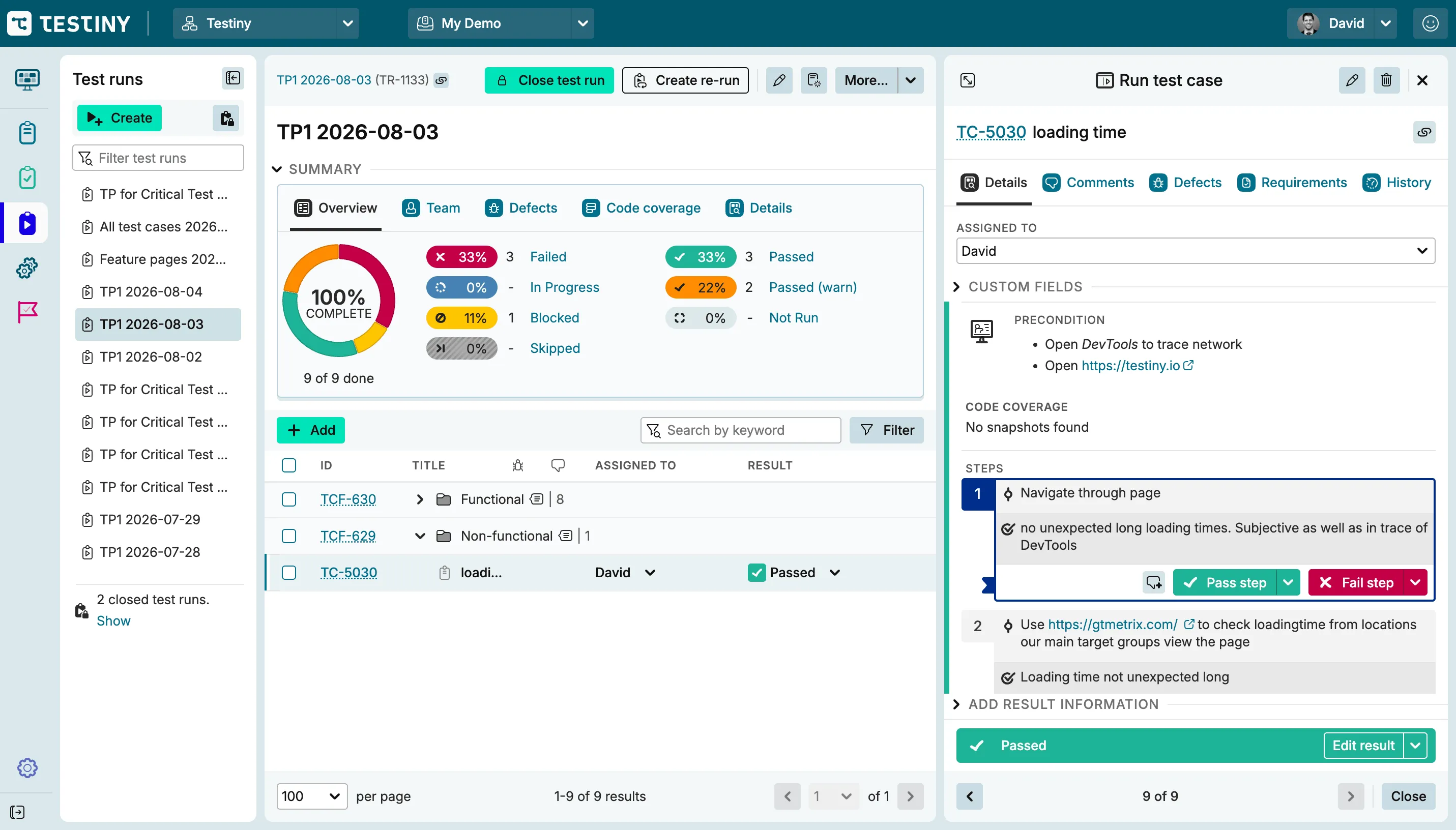
Dashboards and result states update live, not on a delay, with real-time charts and shareable PDF reports across every run.
Reporting & metricsCloud or self-hosted
Secure cloud hosting in the EU, or self-host entirely with Testiny Server — deployable via Docker or Kubernetes for regulated industries.
Testiny ServerEnterprise-ready
Built for teams and businesses of all sizes
Scale your testing operations with enterprise-grade features. Collaborate seamlessly, maintain security compliance, and migrate your existing data effortlessly.
Real-time collaboration.
Enable seamless teamwork with customizable fields and settings for each project. Assign tests to team members for efficient workload distribution. See progress and real-time updates across the whole project.
Learn moreTest management for scaling organizations.
Centralize manual and automated test management with secure, scalable, and fully integrated workflows built for fast-moving teams. With powerful reporting, CI/CD integrations, and enterprise-grade security, Testiny helps organizations release higher-quality software faster and with confidence.
Learn more On-premisesOn-premises installation: Testiny Server.
Testiny Server offers a secure, standalone test management solution for regulated industries ensuring control and compliance. Deploy Testiny Server with Docker or Kubernetes. Contact us to evaluate Testiny Server for your organization.
Learn moreSwitching from another tool?
Import your existing test cases — with text formatting, requirements, and custom fields — via CSV, or use our API to also bring over images and attachments. Most teams are migrated in an afternoon, not a sprint.
Explore further
Discover more test management features
Plan and execute testing
Structure manual test cases, test plans, and automated runs in a single workflow.
Connect your stack
Bring Testiny into the tools your team already uses, and migrate existing test data without the risk.
Scale with confidence
Add governance, on-premises deployment, and milestone tracking as testing scales across teams.
Comprehensive testing tool
Everything for your testing needs in one place
Grouped by what you're trying to do: organize testing, automate and connect it, keep track of it, and govern who can touch it.
Organize your testing
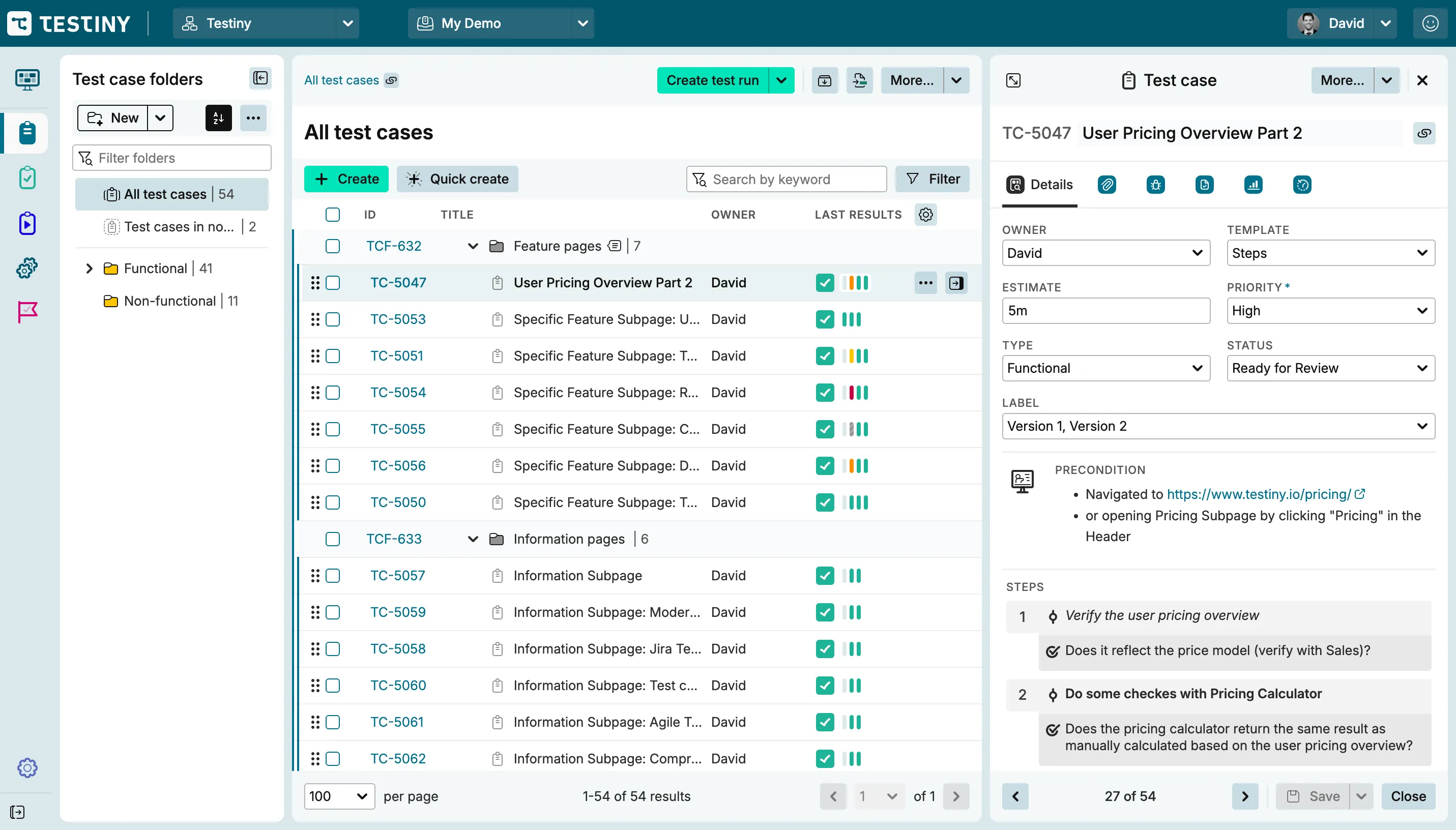
Structure and maintain the test suite itself, in whatever format fits your team. Steps, freeform, and BDD test cases all share the same folder tree.
Test case software.
Easily create, edit, and maintain test cases. Organize them in hierarchical folders and assign them to team members for efficient execution. Reorder with drag and drop, and review edits in a diff view.
Test plans & custom fields.
Structure testing with test plans, and tailor test cases to your needs with custom fields for extra context. Dynamic queries keep a plan updated automatically as matching test cases change.
Test runs & test tracking software.
Set up test runs, assign tasks, and document results to ensure thorough test tracking. Define custom result states beyond pass/fail, or rerun just the failed cases.
Templates & rich text editor.
Start from structured or freeform test case templates, and format steps with rich text, tables, links, and images. Each template includes built-in fields like Priority, Status, and Estimate.
BDD with Gherkin.
Write BDD scenarios in Gherkin syntax, with live validation, syntax highlighting across 20 dialects, and .feature file export. Export scenarios as .feature files for Cucumber, SpecFlow, or Behave.
Automate & connect
Bring in automated results and the tools your team already runs. Automated results, integrations, and AI assistants share one REST API.
Test automation.
Integrate automated tests and consolidate results for streamlined analysis, with a dedicated report view. Results are matched by ID or by title and folder path, with logs and screenshots stored alongside.
Integrations.
Connect with leading issue management tools such as Jira, Azure DevOps, GitHub, GitLab, Linear, Asana, Zendesk, and more. Testiny offers over 25 native integrations, including a license-free Jira connection.
AI support (MCP Server).
Connect AI tools like Claude Desktop and VS Code Copilot to Testiny via the MCP Server to create test cases, run tests, update results, and generate automation code with natural-language commands. Built on the 2025-06-18 MCP protocol standard, it can also generate automation code for Playwright and Cypress.
REST API.
Automate anything the UI can do, or build your own extensions, with a full REST API. Generate API keys with fine-grained permissions, or use Testiny's own CLI to skip raw HTTP calls.
Track & report
Keep visibility on progress, history, and releases. The same history powers the dashboard, exportable reports, and milestones.
Dashboard & metrics.
A tool for test managers: track current and historical metrics in real time. Monitor failed tests and changes with detailed insights. See metrics like tests completed per day, or drill into a single test case's pass/fail history.
Archive results & create reports.
Archive completed test runs and generate shareable PDF reports to communicate findings. Reports export as PDF, Excel, or CSV, and any run can be shared directly via a link.
Milestones.
Add due dates, track progress, and link all test runs for complete visibility with a clear milestone overview. Milestones group manual and automated runs under one release goal.
Requirements traceability.
Link requirements directly to test cases, and connect milestones with requirements coverage to confirm each release meets its acceptance criteria before delivery.
Collaborate & govern
Control who can do what, with a full record of every change. Access control spans SSO, roles, and seat limits for regulated industries.
Role management.
Leverage granular role permissions to control exactly what each team member can see and do. Assign users to groups, with full, execution-only, or read-only roles per project.
Single sign-on.
Sign in through your existing identity provider with SSO from multiple OIDC providers. Named providers include Google, Microsoft/Azure AD, Okta, OneLogin, and Amazon Cognito.
Audit log.
Maintain accountability by tracking all relevant actions in a detailed log. Every action is logged against the specific test case, run, or plan it touched.
Notifications & webhooks.
Choose email, browser, or in-app delivery per event, or post updates into Slack, Microsoft Teams, Discord, Google Chat, or your own webhook endpoint. Frequencies range from immediate to a daily digest, with per-project exceptions to your default.
Explore our test case management solution.
Or start for free and scale up as you go.
Ready to bring manual and automated testing together?
Start your 21-day free trial today – no credit card required.