BDD testing with Gherkin
If your team describes behavior in Gherkin, write your test cases in Gherkin. Testiny's BDD template stores your Given/When/Then scenarios as they are – with syntax highlighting, live validation, 20 Gherkin dialects and .feature file export.
Write your test cases in Gherkin.
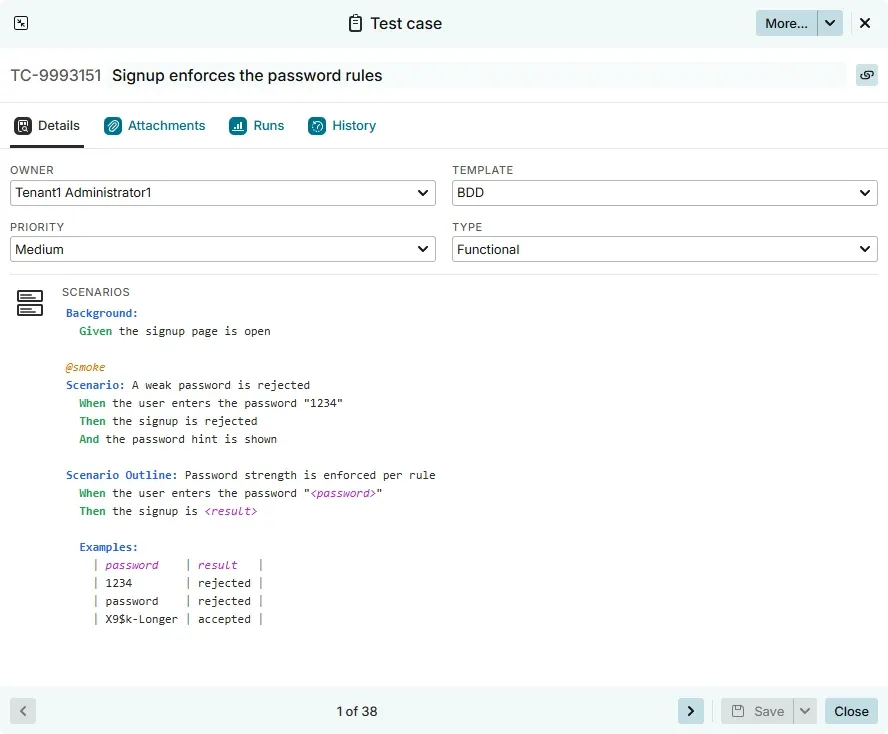
Pick the BDD template and the steps and expected result fields are replaced by a single Scenarios field holding plain Gherkin – exactly what would appear in a .feature file.
- The BDD template.
- One Scenarios field for Given/When/Then. The test case title is the feature name, and shared setup goes into a Gherkin Background section instead of a separate precondition field.
- Syntax highlighting as you type.
- Keywords, step keywords, tags, comments, data tables, doc strings and scenario outline placeholders are colored while you write, so a mistyped keyword is visible immediately.
- Live validation.
- Your scenarios are validated against the real Gherkin grammar. Lines that Gherkin cannot parse are underlined – hover one to see exactly what the parser objected to.
- Built-in Gherkin playground.
- Open “How to write Gherkin scenarios” right above the field: an editable example of every Gherkin construct, safe to experiment in because nothing is saved.
Hand your scenarios to your automation stack.
Gherkin written in Testiny stays Gherkin. Export it as a .feature file and drop it straight into a Cucumber, SpecFlow or Behave project.
- Export a .feature file.
- Download any BDD test case as TC-1234.feature. It carries a # language: directive for non-English dialects, a Feature: line built from the test case title, and your scenarios with no reformatting.
- Export via REST API.
- Fetch the same file from the Testiny REST API, for a single test case or in bulk.

One specification, executed manually or automated.
Your behavior specification lives in Testiny in its original form – whether a tester works through it in a test run or an automation framework runs it in your pipeline.
- Execute BDD test cases in test runs.
- Add them to a test run like any other test case. The runner shows the scenarios read-only with full syntax highlighting, and the tester sets one result for the whole test case.
- Comments, attachments and defects.
- Everything you rely on for other test cases works here too: leave comments, attach evidence, and create or link defects in your issue tracker.
- Scenarios in your reports.
- PDF test run reports print the Gherkin under a Scenarios heading, with syntax highlighting, ready to share.
- 20 Gherkin dialects.
- Write Given/When/Then in any of 20 languages. Testiny detects the dialect from your keywords, or you pick it explicitly or pin it with a # language: directive.
Bring the scenarios you already have.
Gherkin that lives in a spreadsheet or in another test management tool does not have to be retyped. The import wizard takes it over exactly as it is.
- Import existing Gherkin.
- Map the column holding your Gherkin source in the import wizard and the scenarios are taken over verbatim – no Markdown or HTML conversion. One file can mix BDD and step-based test cases.
- Migrating from TestRail?
- Test cases using TestRail's BDD scenario field are recognized automatically and imported as BDD test cases, via the TestRail API as well as the XML export.

Behavior-driven development
Keep the specification and the test case in one place.
Behavior-driven development works because everyone reads the same scenarios. That only holds if the scenarios are somewhere everyone actually looks.
In behavior-driven development, testers, developers and product owners agree on the behavior of a feature before it is
built, and they write that agreement down as Gherkin scenarios – Given a starting situation, When something
happens, Then this is the expected outcome. The format is deliberately plain language, so a scenario is both a specification
a product owner can read and a test an automation framework can run.
The usual problem is where those scenarios live. Feature files in an automation repository are invisible to everyone without a
checkout, and copying them into a test management tool as formatted rich text means the two versions drift apart within a sprint.
Testiny avoids the split by storing the Gherkin itself: the Scenarios field holds plain Gherkin, so the test case
is the specification, and the exported feature file is a faithful copy rather than a reconstruction.
That also means you do not have to move your whole suite to BDD to benefit from it. The BDD template sits next to the steps and
text test case templates, chosen per test case, so behavior specifications, step-by-step procedures and exploratory notes live
in the same folder tree, run in the same
test runs and show up in the same reports. Scenarios your pipeline executes can report
their results back through test automation, while the ones a person walks through stay manual
– and both are the same specification. Read more about
writing and managing test cases in Testiny.
Level up your testing game.
Start using Testiny today.
Free 21-day trial available. No credit card required.